Overview
Teams comparing Usersnap and Sleekplan often want the same developer outcome: a feedback widget they can embed once, theme to match the product, and keep connected to a real backlog. That is an embeddable feedback widget, not a screenshot tool alone and not a board without an install path.
This commercial page owns embeddable feedback widget, feedback widget, widget installation, and custom feedback widget for developers. For marketing and product buying intent around web feedback, see the website feedback tool. For logged-in product context, see the in-app feedback widget.
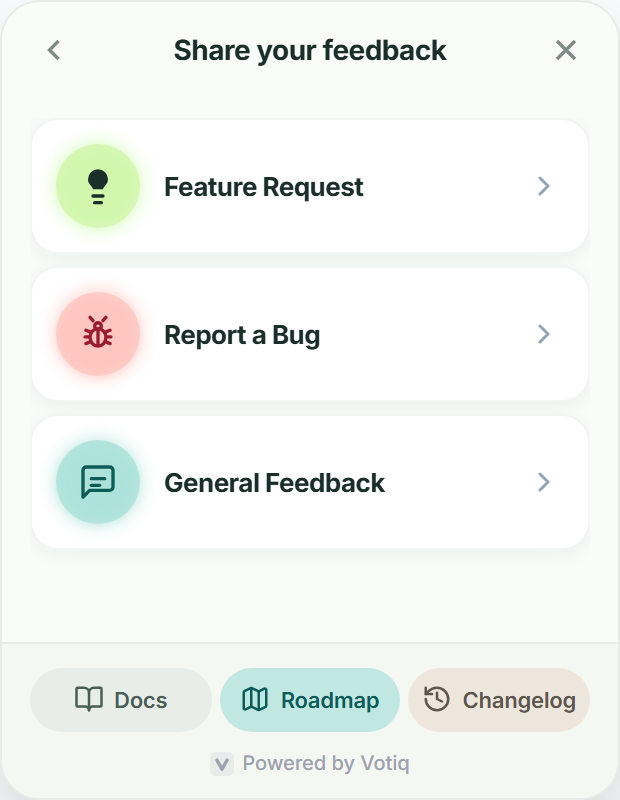
See embeddable feedback widget in the product
Real Votiq screens, not mockups of a different tool.
What is an embeddable feedback widget?
An embeddable feedback widget is a launcher you add to your site or app so users can submit ideas and bugs without leaving the page. For developers, the bar is simple: clear widget installation, low performance cost, and a custom feedback widget that matches brand without forking the SDK.
A feedback widget that only dumps email is unfinished. Votiq connects the launcher to a searchable backlog, votes, roadmap, and changelog so intake becomes shipped work.
For how this page differs from website and in-app commercial intent, read the comparison guide.
Feedback widget installation for developers
Widget installation should be boring. Copy the project embed from Settings → Widget, place it in your layout or footer, and confirm the launcher loads on desktop and mobile.
Use framework docs when you need App Router script strategy, Nuxt head config, or WordPress site-wide scripts. Keep the same project ID across environments with env vars so staging and production do not mix feedback.
After install, verify one test submission lands in the board before you call the feedback widget done.
Custom feedback widget branding and UX
A custom feedback widget should look like part of your product. Set launcher label, primary color, and welcome copy in Settings → Widget so developers are not patching CSS in production.
Keep the first step short: title, category, optional email. Avoid covering primary CTAs on marketing pages. On mobile, confirm the launcher does not block navigation.
For a step-by-step branding checklist, use the widget customization guide.
Embeddable feedback widget vs Usersnap and Sleekplan
Usersnap is strong at annotated screenshots and visual bug capture. Sleekplan is strong at feedback boards and roadmap widgets for indie and SaaS teams. Developers still often need an embeddable feedback widget with clean widget installation, a custom feedback widget theme, and one panel that includes roadmap and changelog.
Votiq is built for that install-and-ship loop: embed once, theme in settings, triage in the same workspace, and publish what shipped without a second announce vendor.
Compare when you need a developer-friendly feedback widget tied to delivery. Keep screenshot tools if visual annotation is the primary job.
Website vs in-app vs embeddable
This page owns the embeddable feedback widget buying intent for developers: feedback widget, widget installation, and custom feedback widget. The website feedback tool page owns marketing and product web-feedback buying intent. The in-app feedback widget page owns logged-in product context.
Pick the commercial page that matches the search. Use one Votiq project across surfaces when audiences overlap.
Do not force “website feedback widget” onto this page. That phrase sits closer to the website feedback tool territory.
A practical install checklist
Use this cadence the first time you ship an embeddable feedback widget.
Create the project and copy the embed snippet.
Complete widget installation in staging with env-based project IDs.
Apply custom feedback widget branding so the launcher matches your UI.
Submit a test item, vote, and confirm it appears on the portal.
Promote one item to the roadmap and publish a small changelog entry so the closed loop is real.
Start with one layout surface. Expand pages after triage is owned.
Why Votiq for developers
Choose Votiq when you want an embeddable feedback widget with clean widget installation and a custom feedback widget that does not require a second product for roadmap or changelog. Plans start from £20/mo with a 7-day trial.
Install on staging, theme the launcher, collect one real submission, and prove the panel closes the loop. That is the developer proof the feedback widget is production-ready.
Frequently asked questions
Quick answers about how this solution fits SaaS teams evaluating feedback and release tools.
What is an embeddable feedback widget? +
A launcher developers embed in a site or app so users can submit feedback without leaving the page, usually connected to a backlog, votes, and status.
What does widget installation involve? +
Copying the project embed snippet into your layout or footer, confirming the launcher loads, and verifying a test submission reaches the board.
Can I ship a custom feedback widget? +
Yes. Set launcher label, colors, and welcome copy in Settings → Widget so the feedback widget matches your product without redeploying for every copy change.
How is this different from Usersnap or Sleekplan? +
Usersnap emphasizes visual bug capture. Sleekplan emphasizes boards and widgets. Votiq focuses on developer-friendly widget installation plus a custom feedback widget tied to roadmap and changelog in one workspace.
Should I use the website or embeddable page? +
Stay here for embeddable feedback widget, feedback widget, widget installation, and custom feedback widget. Use the website feedback tool page for marketing and product web-feedback buying intent.